Best Free TikTok Live Recorder in 2026: Cloud vs OBS vs Screen Recording
The best free TikTok live recorder depends on one question: do you need to save someone else's live hands-free, or just record your own screen?
For saving any public TikTok LIVE without keeping a device switched on, a cloud TikTok live recorder like TokLiveRecorder is the simplest pick to start free. For producing your own broadcast with overlays and scenes, OBS Studio is the stronger free tool. Phone screen recording is free and already built in, but it ties up your phone and captures the screen, not the source stream. Below is how the free options really compare — and which one fits you.
The three free ways to record a TikTok LIVE
There are only three genuinely free approaches, plus one trap:
- Cloud recorder — a web tool records the public live on its own servers. You paste a link and walk away.
- OBS Studio — free, open-source desktop software that captures whatever is on your screen or in a window.
- Phone screen recording — the built-in iOS/Android recorder captures your screen while you watch the live.
- The trap — tools that advertise "free" without saying up front what they lock — recording length, quality, or downloads — behind a paid plan.
Free TikTok live recorder comparison (2026)
| What matters | TokLiveRecordercloud | OBS Studio | Phone screen rec. |
|---|---|---|---|
| Record someone else's live by link | ✅ | ⚠️manual window capture | ⚠️record what you watch |
| Keeps recording with your device off or away | ✅ | ❌computer must stay on | ❌screen must stay on |
| Original source quality (not a screen grab) | ✅ | ⚠️depends on setup | ❌screen capture only |
| Saves a full 2-hour live unattended | ⚠️on Pro/Studio; Free stops at 20 min | ⚠️if the PC stays awake | ❌ |
| No install, no setup | ✅ | ❌download + configure | ✅built in |
| Free to start | ✅2 a day, 20 min each | ✅ | ✅ |
| Full production control (overlays, scenes) | ❌ | ✅ | ❌ |
Notice no column is all green. OBS wins on production control and ties on quality; phone recording wins on zero install and is free with no cap; the cloud recorder's free plan carries a daily cap and a 20-minute limit per recording, and gives you no production control at all. Each tool is the right answer for a different job — the trick is matching the tool to yours.
When each one wins
Cloud recorder — best for hands-free, someone else's live
A cloud TikTok live recorder lets you record a TikTok live online without installing anything — the easiest free option when you want to save a creator's public live and get on with your day. You paste the live's link or @username, and the recording runs on the server until the stream ends or your plan's per-recording limit is reached (20 minutes free, up to 3–6 hours on paid plans) — you can close the tab, lock your phone, or walk away. Because it copies the stream's own bytes rather than filming a screen, the file has no comments overlay and no quality loss.
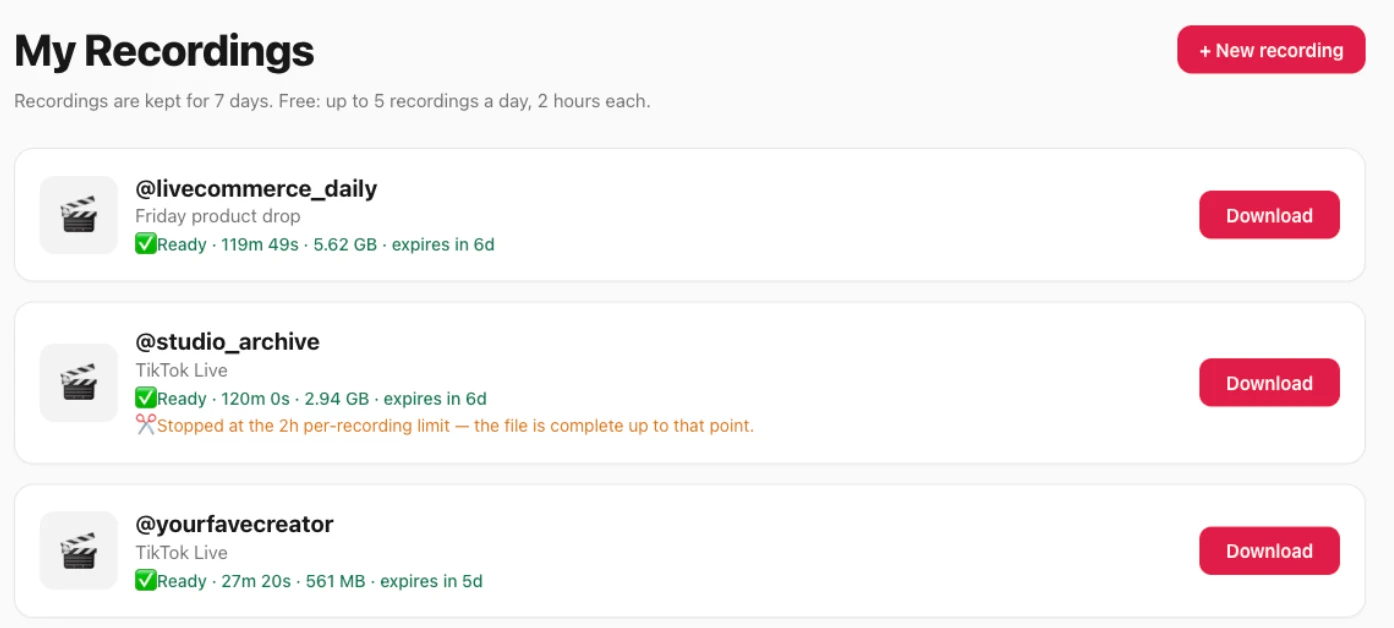
The file size just tracks the broadcast: in our own recordings a two-hour live comes back around 3–5.6 GB depending on the stream's bitrate — the size of the original, not the bloated re-encode a screen recording produces.
The honest limits are shown right on that screen: sign in with Google or email and the free plan gives you 2 recordings a day, up to 20 minutes each. For full-length lives, Pro ($79/year) records up to 3 hours per recording and Studio up to 6 hours. Saved recordings are kept for 3 days on Free (7 on Pro, 30 on Studio), so download the ones you want in time. And it can only record a live while it's actually broadcasting — no tool can recover a live that already ended and was never recorded.
OBS Studio — best for producing your own stream
OBS Studio is free, open-source, and far more powerful than any web recorder if you're building your own broadcast with overlays, multiple scenes, and local high-bitrate capture. That power is also its cost: it's desktop-only, there's a real learning curve, your computer has to stay on and awake for the whole recording, and capturing someone else's TikTok live means manually setting up a window capture. For unattended, save-someone-else's-live jobs, it's overkill.
Phone screen recording — best for a quick, one-off grab
If you just want to capture a moment of a live you're already watching, the recorder built into iOS or Android is genuinely free and needs nothing installed. The catch: your phone is occupied and its screen must stay awake the whole time, the recording includes the on-screen comments and UI, and quality is limited to what your screen shows. It's fine for a short clip, weak for saving a two-hour live in full. (On Android specifically, see our guide on how to record a TikTok live.)
iOS vs Android matters here. On iPhone, the screen recorder in Control Center captures the phone's own audio, so the live's sound comes through cleanly — but you're still saving the whole screen, comments and all. On Android, where the tile lives and whether it records internal audio varies by brand (Samsung, Pixel, and Xiaomi each handle it differently), and some builds only capture the microphone, so you end up with room noise instead of the stream's audio. Neither platform gets you the source stream — both save the display.
"Free" tools that aren't really free
Some online recorders headline "free TikTok live recorder" but only reveal the limits — recording length, download, or full quality — after you've started. A paid tier isn't dishonest in itself (ours has one too), but read the limits before you rely on a tool. One that records ten minutes and then asks for a card before you can download isn't a free recorder in any way that helps you.
What TikTok itself saves
TikTok does not give viewers a replay once a live ends. Creators can keep a replay of their own LIVE for up to 30 days if they turned that setting on before going live — that figure is from TikTok's own LIVE Replay help — but as a viewer you get nothing after the stream stops (more on that in our guide to the TikTok Live replay). That's exactly the gap a recorder fills: if you think you'll want a live later, you have to capture it while it's still airing.
Is it legal to record a TikTok live?
In most places, recording a public live stream for your own personal use sits in the same territory as saving any other public video — but it's the creator's content, so the responsible line is simple: record public lives only, keep the file for personal use, don't rebroadcast or monetize someone else's stream without their permission, and follow the rules where you live. A server-side recorder captures only the public stream and isn't affiliated with TikTok. This is general information, not legal advice — if you're recording at scale or for commercial use, check your local laws first.
Which free TikTok live recorder should you use?
- Saving someone else's public live, hands-free — a cloud recorder like TokLiveRecorder.
- Producing and recording your own stream with overlays — OBS Studio.
- Grabbing a quick clip of a live you're watching right now — your phone's screen recorder.
- Anything that asks for payment to finish a recording — skip it, or read the free-tier limits first.
Try it yourself
Paste a TikTok LIVE link and start free — 2 recordings a day, no install, no screen recording.
FAQ
What's the best free TikTok live recorder for recording other people's lives?
A cloud recorder is the simplest option you can start free, because it captures the public stream on its servers and keeps going after you close the tab — free tiers usually cap recording length, so check the limits. OBS can do it too but needs manual setup and a computer left running.
Can I record a TikTok live without them knowing?
A server-side cloud recorder captures the public stream without installing anything on your device or theirs, and TikTok doesn't notify a creator that a viewer recorded their public live. Only record public lives, and follow the streamer's rights and local laws.
Is OBS or a cloud recorder better for TikTok lives?
OBS is better if you're producing your own broadcast; a cloud recorder is better if you want to save someone else's live hands-free without keeping a computer on.
Are free TikTok live recorders actually free?
OBS and phone screen recording are fully free. Cloud recorders are usually free to try with caps — ours gives 2 recordings a day, up to 20 minutes each, on the free plan, with paid plans for longer lives. Watch for "free" tools that hide their limits or lock downloads until you pay.
Can I still record a TikTok live after it ended?
No. If a live wasn't recorded while it aired, it's gone — TikTok doesn't save it for viewers. Start a recording while the creator is live so you can rewatch it later.